At 7:00 p.m. Eastern on October 9, our four-person team started with a fresh
create-next-app project and an idea: make quantum computing something people
could learn by running experiments, not memorizing slogans.
Forty-eight hours later, at the October 11 deadline, we had built Quantum Quest. It had 21 runnable lessons, seven games for younger learners, a visual circuit Lab, learning roadmaps, an AI tutor, and an error-correction challenge that ran through Qiskit on Qollab's simulators.
That sentence makes the weekend sound much cleaner than it was.
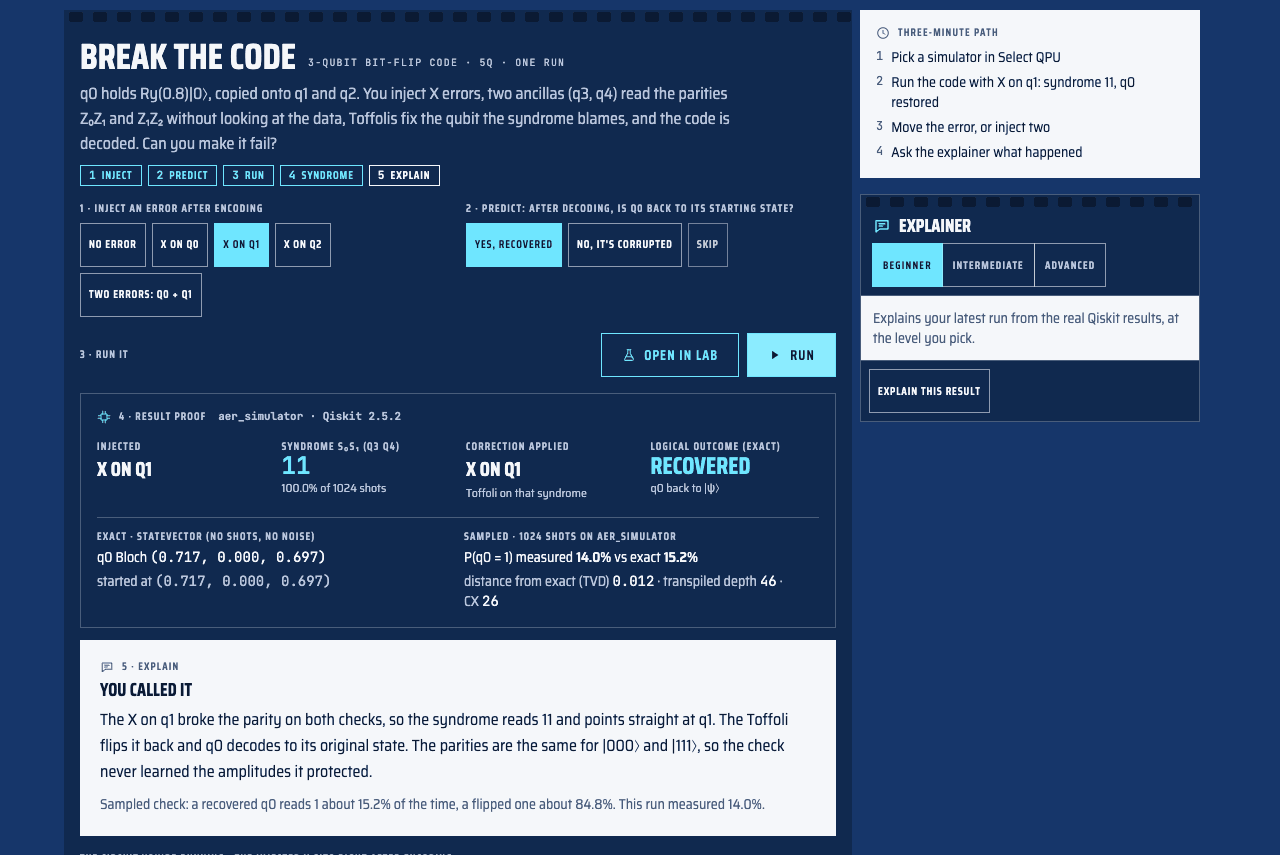
Break the Code, the experiment judges see when Quantum Quest opens on Qollab.
The hackathon
The Qollab x IonQ Global Quantum Hackathon was a 48-hour distributed event with student and professional tracks. Teams could have up to four people, and projects had to use Qiskit, run on Qollab's free simulators, be published under an MIT licence, include a short demo, and follow accessibility best practices.
We also had to prove that the work happened during the build window. Quantum Quest did not exist before the event. We started from the standard Next.js scaffold, and the code, lessons, design, and documentation were written between October 9 and October 11.
Those rules affected how we worked. We kept a public commit history, wrote down
the submission requirements in HACKATHON.md, disclosed the libraries and AI
tools we used, and built a release check that refused to package the Qollab
version while required project links were still missing.
The problem we chose
Quantum computing is often taught from one of two directions. One starts with linear algebra and asks learners to hold a lot of theory before they can try anything. The other uses friendly animations that never execute a real quantum circuit.
Both can leave the same gap. Someone can repeat that a qubit is in a superposition or that measurement changes a state without being able to predict the output of a small circuit. Noise is often saved for later even though it is central to understanding present-day quantum computers.
We wanted the circuit to be the lesson. A learner should make a prediction, run the circuit, see the exact and sampled results, and explain why those results agree or disagree with the prediction.
That became the main loop in Quantum Quest:
Predict → Run → Explain
Eight lessons ask for a prediction before enabling the run. The incorrect answers are common misconceptions rather than random distractors. After the run, the explanation uses the circuit's own counts, probabilities, Bloch vectors, and noise settings. A wrong answer gives the learner something specific to investigate.
One engine, several ways to learn
We built one Qiskit engine for every part of Quantum Quest, then changed the language and depth for each audience.
- Explorer, for ages 8–12 with no maths required: seven planet games about measurement, superposition, interference, entanglement, and gates.
- Student, for high school and first-year university: qubits, phase, Bell states, teleportation, and Deutsch-Jozsa.
- Developer, for programmers new to quantum: Qiskit, bit ordering, transpilation, noise, Grover's search, the QFT, and variational circuits.
- Researcher, for graduate-level learners: density matrices, mitigation, error correction, phase estimation, VQE, QAOA, and benchmarking.
- Concepts, after the Student basics: Wiesner's quantum money, the Bell test, and Shor's algorithm factoring 15.
The Student, Developer, Researcher, and Concepts collections contain 21 lessons. Each lesson has a runnable circuit, notes on what to watch, changes to try, and a check question. The separate Explorer path turns the same ideas into games, including a quantum coin, entangled twins, and a gate machine. Five prerequisite-aware roadmaps connect the lessons, games, experiments, videos, and readings.
The hard topics are interactive too. Learners can change a Bell test and see the Bell score, run the compiled modular circuits used in the Shor lesson and see which factors it finds, or change the key in the quantum-money lesson and measure how often a forged banknote survives verification.
Building the Quantum Lab
The Lab is the free-build side of the project. It supports one to eight qubits and 19 gates, including parameterized rotations and multi-qubit gates. A learner can click or drag a gate onto the circuit, change the number of shots, add a noise model, or load a circuit from a lesson.
After a run, the Lab shows more than a bar chart:
- measured shot counts with the exact probabilities overlaid;
- a Bloch sphere for each qubit, including the reduced-state purity;
- the full statevector with amplitude and phase;
- a step-through view of the Bloch vectors after each gate;
- generated Python, OpenQASM, and a text circuit diagram;
- transpiled circuit depth and controlled-X gate count.
Keeping exact values separate from sampled values was important. A statevector describes the exact simulated state. Shot counts are samples and can vary from run to run, especially with noise enabled. Combining them into one number would make the interface easier to build and harder to trust.
Break the Code
We needed one experiment that could explain the project to a judge in about three minutes. We chose the three-qubit bit-flip code because it demonstrates a hard topic with a result that is easy to test.
Break the Code lets the learner inject no error, an X error on q0, q1, or
q2, or two errors. Before running, the learner predicts whether the encoded
state will recover. The circuit then measures two syndrome bits, identifies a
correction, applies it, and reports the logical result.
An X error on q0 produces syndrome 10; q1 produces 11; and q2
produces 01. Each single error can be located and corrected. With two
errors, the same syndrome can point to the wrong qubit. The code applies a
correction and returns the logical state flipped. That failure is part of the
lesson: a distance-three code corrects one error, not two.
The result-proof panel records the simulator, Qiskit version, transpiled depth, controlled-X count, measured distribution, exact distribution, and the distance between them. On a noisy IBM or IonQ device model, the ideal syndrome may no longer appear on every shot. The panel says that instead of pretending the noisy result was perfect.
We also designed Break the Code as one circuit and one job. That mattered on Qollab because the IonQ simulators accepted one job per project run during the hackathon.
How the system works
The full web app uses Next.js and TypeScript for the interface. Requests to
/api/qiskit/* are forwarded to a FastAPI service, which validates the
circuit and calls a shared Python engine. That engine uses Qiskit Aer to build
the circuit, calculate statevectors, reduce individual qubit states, compute
Bloch vectors and purity, transpile the circuit, and sample the selected
backend with or without noise.
Qollab needed a different route. Its projects run Python in the browser
through Pyodide, so the normal HTTP service was not available. We extracted
the Qiskit work into backend/engine.py, bundled the same engine with the
Qollab lesson player, and added a swappable transport. The web app calls
FastAPI; the Qollab version calls Python through the browser bridge. The
lesson and result components do not need to know which transport produced the
run.
The tutor is separate from the quantum engine. In the full app, /api/tutor
streams explanations from Claude at beginner, intermediate, or advanced
depth. The prompt includes the learner's actual run rather than asking for a
generic description of the topic. Without an API key, Quantum Quest uses a
deterministic offline explainer built from the same results. On Qollab, that
offline explainer is the default because the hosted tutor endpoint is not part
of the browser bundle.
Progress, notes, bookmarks, streaks, badges, and certificates are stored in
localStorage. That kept the hackathon version usable without accounts or a
database, but it also means the data is per-device.
Working as a four-person team
Forty-eight hours is too short for four people to work through one task list in sequence. We split the project across the learning roadmaps, interactive concept lessons, Qollab integration, curriculum, interface, and judging flow, then used branches and pull requests to combine the work.
My first contribution was the initial Qiskit-backed platform: the Explorer games, the first 18 modules, the Lab, the FastAPI service, the tutor, and the progress system. I later redesigned the interface into the Select Rail visual system, then worked on the pieces judges would touch first. Those commits included Break the Code, the Judge Start screen, the three-minute judging path, and a tutor focus fix that stopped the page from stealing the first keyboard tab stop.
Other parts of the team work added prerequisite-aware roadmaps, the quantum money lesson and its live demos, Qollab packaging, shared navigation, and the review passes that caught problems in the physics, noise simulation, responsive layout, and accessibility.
We used Claude, ChatGPT, and OpenAI Codex as coding and writing assistants. The repository's disclosure records where they were used. We still had to decide what to build, review the generated work, test the physics, integrate the branches, and remove features that did not hold up. Throughout the weekend, we kept asking whether each number on screen could be traced back to a real run.
Correctness and accessibility
Quantum education software can teach the wrong lesson while still looking convincing. We added Python checks for the shared engine, JavaScript checks for the browser bridge, and lesson checks that run every lesson circuit through the engine with physics assertions.
One bug showed why that mattered. Qiskit's default transpilation optimization could cancel gate pairs before a noisy run. The circuit became mathematically equivalent, but the removed gates never received simulated gate noise. We changed noisy runs to use optimization level zero so every gate the learner placed remains in the noise simulation.
For accessibility, the circuit editor works from the keyboard, dialogs trap focus and close with Escape, lesson shortcuts can be disabled, and reduced motion turns off the main animations. We ran axe-core at 1440 and 390 pixels on the Qollab player and the main web routes. The final automated scans found zero WCAG A or AA violations. That did not replace manual testing; a full screen-reader pass and Lighthouse recording were still open items at the submission cutoff.
What we did not finish
The limits are as important as the feature list.
Quantum Quest does not run on real quantum hardware. The web app uses Qiskit Aer, and Qollab provides ideal simulators plus IBM and IonQ device noise models. Those models are useful for comparing machines, but they are still simulators.
There are no accounts yet. Progress and certificates remain per-device, and a certificate ID cannot be verified by a server. The teacher dashboard supports one learner, not a class, and the lessons do not adapt their difficulty based on performance. The Explorer games and streamed Claude tutor also require the full local web app; the 21 lessons, Lab, roadmaps, and offline explainer are the parts packaged for Qollab.
We had ideas for all of those areas. Shipping fewer honest features was a better choice than hiding unfinished work behind a polished button.
What I learned
I came away from the weekend thinking differently about both quantum computing and educational software. The lesson comes from connecting the learner's prediction to a working circuit, the real output, and the reason the two differ.
I also learned how much the delivery environment can shape a design. Qollab's browser runtime, simulator selection, one-job limit, packaging rules, and three-minute judging window all changed the architecture. Treating those constraints as late deployment details would have left us with a project that worked locally and failed when it mattered.
You can run Quantum Quest on Qollab, watch the three-minute demo, or read the public source and full disclosure. Start with Break the Code. Move the error between the three qubits, then choose two errors and watch the same correction system reach its limit.